Debt Repayment Plan Calculator: What It Tells You
Use a debt repayment plan calculator to model payoff timelines, total interest, and avalanche vs snowball. Practical inputs, outputs, and sample plans.

Daniel Anderson
Editor, The Money Maniac
September 16, 2026
14 min read

Sarah is doing what many borrowers do: paying a large amount every month, then staring at several balances that barely seem to move. She's a 31-year-old nurse with $7,400 on a Visa at 24.99% APR, an $18,200 auto loan at 7.2%, and $22,500 in federal student debt at 5.5%. She sends $1,000 a month toward the pile, but without a clear order, her progress feels invisible.
A debt repayment plan calculator turns that pile into a schedule. It shows which account receives extra money, when each balance reaches zero, how long the full plan may take, and how much interest the borrowing costs. That clarity matters because sending the same total payment every month can produce very different results depending on which debt gets the extra dollars.
The calculator has limits. It won't predict an income loss, know whether a variable rate will reset, or decide how much cash you should keep for emergencies. Think of it as a map of the debt you already owe, not a forecast of your entire financial life.
The Debt Picture You Are Trying to Model
Sarah is not managing one debt. She is managing three accounts with different rules. The Visa is expensive revolving debt. The auto loan is secured installment debt tied to a vehicle. The student loan carries a lower rate and may follow different repayment terms. Combining them into one balance hides the decision that controls the result: where the next extra dollar goes.
A debt repayment plan calculator separates those accounts and applies a payment order. Sarah enters each balance, rate, and minimum payment, then compares an avalanche sequence with a snowball sequence. The output should show a projected schedule, not merely recommend paying faster.
Practical rule: Reject any result that shows only a final payoff date. Look for the account order, payment assigned to each debt, total interest, and the month each account reaches zero.
The model also reveals tradeoffs that bank statements obscure. Extra money directed to the Visa should generally reduce interest faster than the same payment sent to the student loan. A missed auto payment changes the priority, however. The vehicle loan can carry consequences beyond interest because default may put the car at risk.
A household debt model must handle several balances and rates at once. A calculator built around one balance or one rate cannot represent a mixed stack like Sarah's. The Federal Reserve Bank of New York's household debt data provides broader context for the separate types of debt households carry, but the calculator's job is narrower: show how Sarah's specific balances respond to her payment order.
The payment total matters as much as the ordering. Sarah sends $1,000 a month, but the schedule is useful only if that amount remains available after rent, food, insurance, and irregular bills. The model also needs a reality check for job changes, medical costs, rate adjustments, and the cash reserve that prevents a new charge from undoing the plan. A clean payoff date based on an unsustainable payment is a spreadsheet result, not a workable plan.
Calculator Inputs and What Each One Really Assumes
The output is only as honest as the inputs. Entering clean-looking numbers from memory can produce a beautifully organized answer to the wrong question.
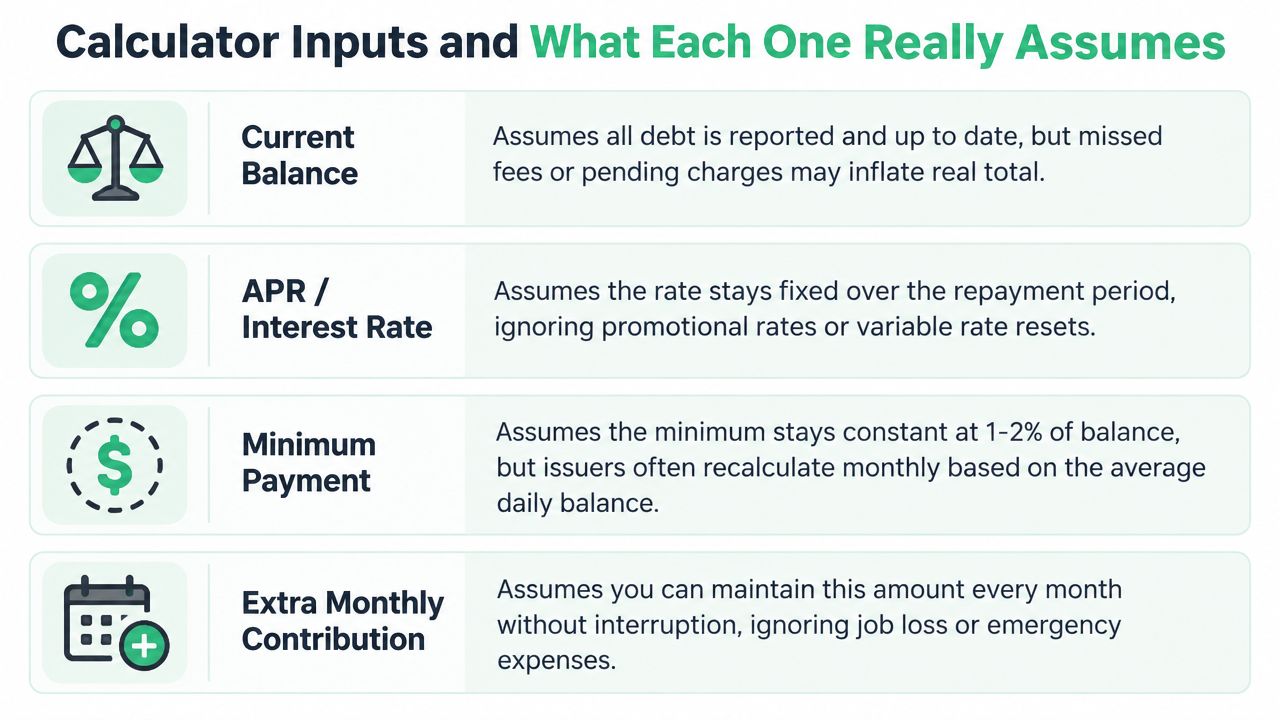
Current balance
Use the balance from the latest statement or lender account, ideally before making the next payment. Include pending interest, fees, and charges that will post before the payment is applied. Don't round a balance down just to make the spreadsheet look friendlier.
The hidden assumption is that the number stays accurate. A credit-card balance changes when you make purchases, receive refunds, or incur fees. If you keep charging the card, the calculator models an old balance while your real debt follows a different script.
APR or interest rate
Enter the regular rate that applies after a promotional period, not only the introductory rate. For variable debt, record the current rate and mark the account for review because the result assumes the rate won't change unless the calculator includes rate scenarios.
APR is also a simplification for revolving debt. Credit-card issuers commonly calculate interest using a daily periodic rate, so the monthly result won't perfectly match a simple APR divided into monthly slices.
Minimum payment
Enter the actual required minimum, not an amount you hope to pay. The calculator uses it as the payment that keeps the account current while extra money goes to the target debt.
Minimums can change as balances and interest change. A calculator that freezes them may understate the amount needed in later months or overstate how quickly the balance falls.
Extra monthly contribution
This is the additional amount available after all minimums. Don't include a minimum payment twice. If your total debt budget is $1,100 and your listed minimums add up to $725, the extra contribution is the remainder, not the full $1,100.
For irregular income, run separate scenarios for ordinary months and lump-sum payments. A fixed monthly add-on assumes you can sustain it without interruption.
Before clicking calculate, verify:
- Statement date: Confirm every balance is current.
- Regular APR: Replace teaser rates with the post-promotion rate when appropriate.
- Minimums: Copy each lender's required payment exactly.
- Payment budget: Separate minimums from extra money.
- New borrowing: Decide whether the model assumes no additional charges.
- Rate behavior: Flag variable, deferred-interest, and penalty-rate accounts.
If your situation involves a court-supervised repayment structure, a specialized plan calculator for Utah filers may use assumptions that differ from a general consumer payoff model. For a straightforward personal debt comparison, you can also use The Money Maniac debt payoff calculator to compare payoff orders.
How the Calculator Calculates Interest in Practice
A card balance can grow between payment dates because interest may accrue each day. Many issuers convert APR into a daily periodic rate by dividing it by 365, then apply that rate to the balance used for the billing calculation. At 24% APR, the daily rate is about 0.0658%. The number you enter as the balance therefore matters, but so does the timing of charges and payments.
Installment loans follow a different schedule. Auto loans and many student loans generally charge simple interest on declining principal. Early payments contain more interest because the outstanding principal is larger. As that principal falls, more of each scheduled payment reaches the balance.
A basic calculation sequence is:
- Calculate interest for the period.
- Apply the payment to interest first.
- Use the remainder to reduce principal.
- Redirect the freed payment after an account reaches zero.
That sequence exposes the assumption many calculators hide: every payment must cover accrued interest before it can make meaningful progress against principal. A high-rate balance consumes more of an extra dollar than a low-rate balance over the same period. That rate difference is the mathematical basis for avalanche repayment. For a separate view of how interest growth behaves, use this compound interest calculator, then remember that revolving debt still depends on the issuer's actual daily-balance method.
| Debt Type | Rate Basis | Compounding | Payment Allocation |
|---|---|---|---|
| Credit card | APR converted to a daily periodic rate | Often calculated daily against average daily balance | Interest and fees first, then principal |
| Auto loan | Contractual fixed or variable APR | Simple interest on declining principal | Scheduled interest, then principal |
| Student loan | Contractual loan rate | Interest accrues under the loan terms | Accrued interest, then principal |
A calculator remains an estimate unless its assumptions match the lender's contract. Use the result to choose a repayment order, then compare the projected balance with your actual statements. Differences usually point to payment timing, fees, rate changes, or a balance the model failed to include.
Minimum Payments and the Trap of Negative Amortization
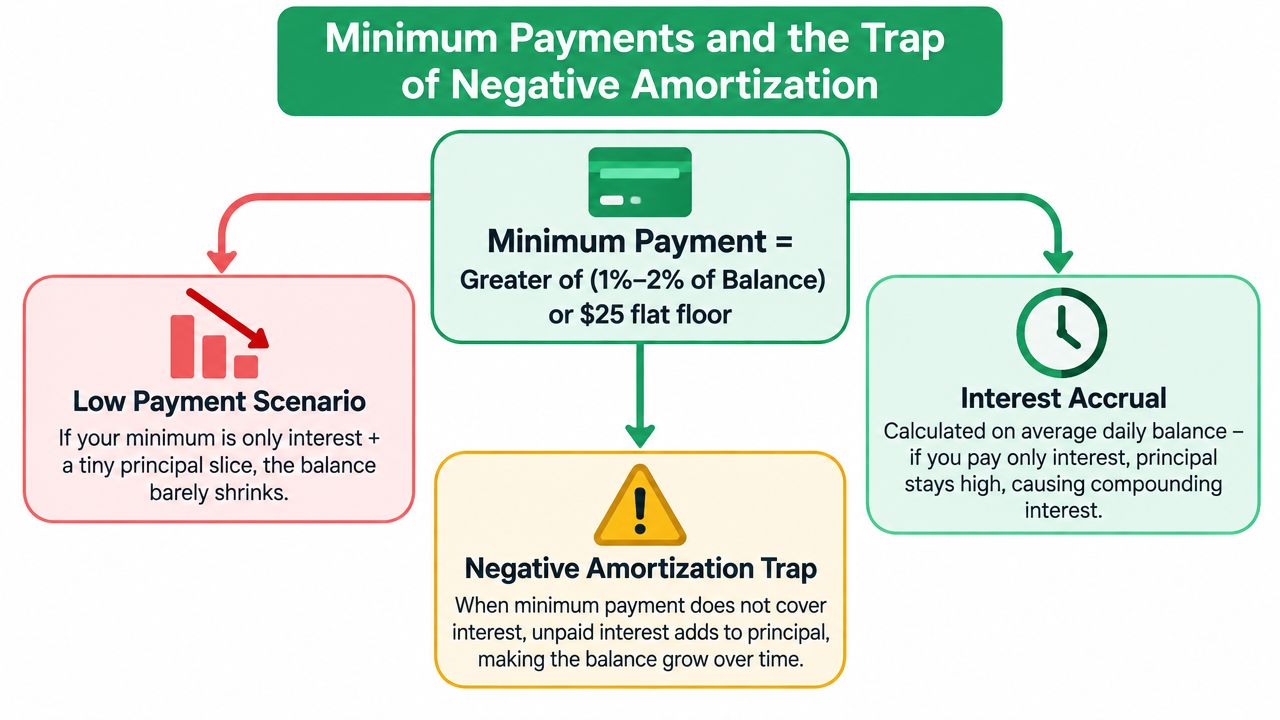
A minimum payment can keep your account current while barely touching the balance. Issuers commonly calculate it as a percentage of the balance or a flat minimum, sometimes adding interest and fees to the formula. Because each account uses its own terms, treat the statement as the authority and enter its actual minimum into the calculator.
Take a $5,000 card at 24% APR. Rough monthly interest is about $100, before daily balance timing changes the result. If the minimum is also $100, nearly the entire payment can cover interest. Principal then moves only slightly, if at all.
Negative amortization occurs when the payment is smaller than the interest that accrues. For example, a $15 payment against $20 of interest leaves the balance $5 higher. Paying on time does not guarantee that you are reducing what you owe. The consumer debt payoff explanation of negative amortization describes this same mechanism.
How to find the warning
Read the statement disclosure for minimum-only payments. It should show the projected repayment duration and total cost. If the balance barely falls, mark that output as a warning. The calculator is modeling account maintenance, not a serious payoff plan.
Use 1% of the balance per month as a practical screening standard for meaningful progress. This is not a lender requirement. It is a budgeting benchmark that separates staying current from actively reducing principal.
If minimums consume nearly all available cash, do not set an extra-payment target that causes missed payments elsewhere. Keep every account current first, then direct surplus money toward one target. For broader consumer-debt context, consult this consumer debt guide from LifeBack Law Firm, P.A.. A calculator can clarify the mechanics, but it does not replace legal advice.
Avalanche vs Snowball, Compared Honestly
Avalanche directs extra money to the debt with the highest APR while you keep paying minimums on every other account. Snowball targets the smallest balance first, regardless of its rate. Both plans require every account to remain current.
When interest rates differ, avalanche is the cheaper mathematical choice. A 2023 peer-reviewed study in the Southern Economic Journal found that snowball repayment produced higher total interest costs for the average household, with the gap ranging from 1.8% to 4.3%. The study summary reported median interest of $15,063 under avalanche, according to the study summary and source. The same comparison showed that snowball could require fewer total payments, 143 versus 202. A calculator should therefore show both total interest and payoff duration, not just the month each balance reaches zero.
Snowball's advantage is behavioral. An observational study of more than 6,000 debt-settlement clients tracked between 2011 and 2014 found completion rates about 15 percentage points higher for snowball than avalanche, despite avalanche's lower interest cost, as summarized by Credit Karma's debt repayment calculator guidance.
| Factor | Avalanche | Snowball |
|---|---|---|
| Target order | Highest APR first | Smallest balance first |
| Interest cost | Usually lower when rates differ | Usually higher when rates differ |
| Early motivation | The first payoff may take longer | An earlier visible win |
| Best fit | Borrowers who can stay disciplined | Borrowers who have abandoned payoff attempts |
| Main risk | Losing momentum before the first payoff | Paying extra interest for psychological progress |
Use avalanche by default. It sends each extra dollar toward the balance generating the most interest, so the calculator's interest total should usually be lower. Choose snowball if you have repeatedly stopped mathematically optimal plans. Finishing a costlier plan beats abandoning a cheaper one. Review this debt payoff plan comparison, then compare total interest, payoff date, and the payment order your budget can sustain.
A Worked Sample Plan You Can Replicate
Use this sample as a formatting model, not as a promise that every calculator will produce identical results. The stack contains a $2,400 store card at 28.99% APR with a $60 minimum, a $6,800 Visa at 22.99% APR with a $170 minimum, a $9,200 auto loan at 7.5% APR with a $285 minimum, and an $18,500 federal student loan at 5.5% APR with a $210 minimum.
The total monthly debt budget is $1,100. Under avalanche, the store card receives the extra money first, followed by the Visa, auto loan, and student loan. The projected stack reaches zero in 31 months, with roughly $4,150 in total interest.
| Creditor | Starting Balance | APR | Minimum | Target Order | Projected Payoff |
|---|---|---|---|---|---|
| Store card | $2,400 | 28.99% | $60 | 1 | First |
| Visa | $6,800 | 22.99% | $170 | 2 | After store card |
| Auto loan | $9,200 | 7.5% | $285 | 3 | After Visa |
| Federal student loan | $18,500 | 5.5% | $210 | 4 | Month 31 |
The same balances and budget run through snowball in a different order because the store card is also the smallest balance here. The planned result is about $640 more interest and four additional months than the avalanche projection. That difference is the price of changing the order, not a mysterious calculator error.
Copy your own rows in this format:
Creditor, balance, APR, minimum, target order, monthly payment.
When an account reaches zero, add its former minimum to the next target. Don't lower the total budget just because one bill disappeared. If the auto loan's payment or rate becomes uncomfortable, review options such as refinancing a car loan as part of a debt-free plan, but compare the new total interest and term rather than celebrating a smaller monthly bill.
When the Stack Has Mixed Rates and Competing Priorities
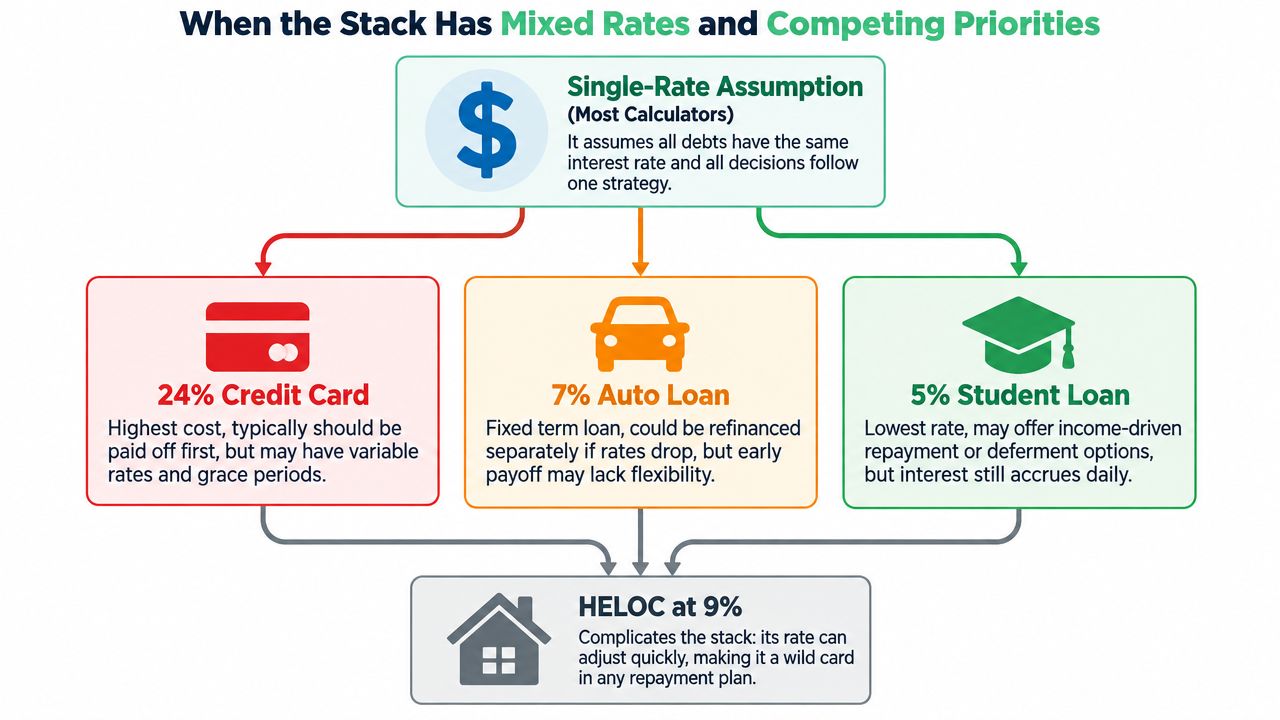
A single APR ranking is useful, but it can be dangerously incomplete. A high-rate credit card, a lower-rate auto loan, a student loan, and a HELOC don't carry the same consequences if you miss a payment.
Three practical buckets
Emergency-rate debt includes costly revolving balances, variable-rate borrowing, and accounts with rates that can change sharply. These usually deserve aggressive attention after minimums are covered.
Strategic-rate debt includes fixed installment loans where default can threaten collateral or create serious practical disruption. An auto loan may have a lower APR than a credit card, but a near-default vehicle payment deserves immediate protection.
Patient-rate debt includes lower-rate, fixed obligations where the borrower has more flexibility. Student loans may also have repayment, deferment, or income-based options that a basic calculator doesn't model.
That framework prevents a false precision problem. A calculator might rank a 24% card above a 7% auto loan, but delaying a car payment until penalties or repossession risk emerge can erase the expected interest advantage. I won't invent a penalty amount for that scenario because the contract controls it. Check the agreement and lender notices.
Watch for terms that change the math:
- Deferred-interest promotions: The balance may appear cheap until a deadline activates accumulated charges.
- Introductory rates: The promotional APR can hide the rate that applies afterward.
- Penalty APRs: A missed payment may trigger a new rate under the account terms.
- Variable credit lines: A rate increase can make yesterday's payoff schedule stale.
Re-run the calculator whenever one of those conditions changes. The right priority is the one that reduces cost while keeping high-consequence accounts current.
Stress Testing Your Plan for Rates, Shocks, and Liquidity
A payoff date earns your trust only after it survives an unpleasant scenario. Most basic calculators assume the payment continues, the rate stays put, and no emergency arrives. Household finances rarely cooperate that neatly.
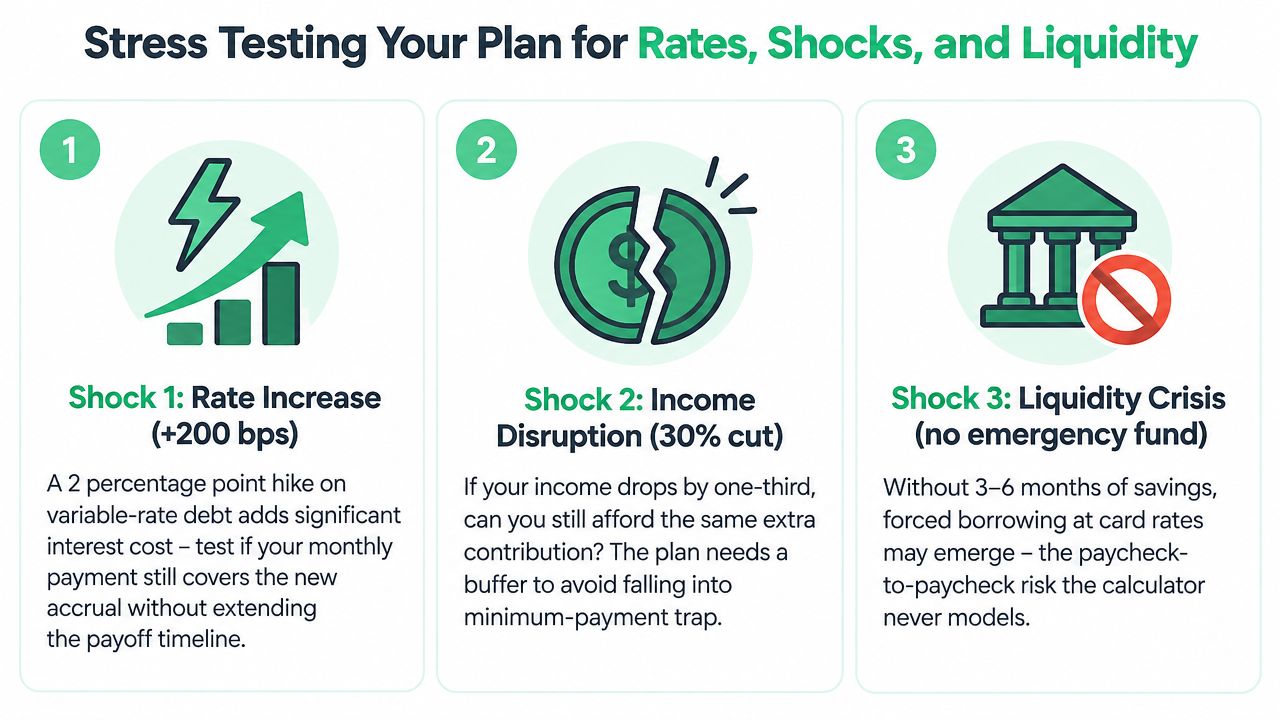
Run three separate versions of the plan:
- Rate shock: Increase variable debt by 200 basis points, or 2 percentage points, and check whether the payment still covers new interest.
- Emergency expense: Add a one-time $1,500 expense in the middle of repayment and remove that amount from the debt budget.
- Income interruption: Model one month without the extra contribution. Minimums still need to be paid.
Track three outputs:
- Base-case payoff date: The result if nothing changes.
- Stressed payoff date: The result under a realistic setback.
- Liquidity floor: The minimum cash reserve you won't spend on extra principal.
The stress-test illustration also uses a 30% income cut and highlights the risk of having no emergency fund, as shown in the required visual above. The point isn't to predict your exact crisis. It's to discover whether your plan collapses after one bad month.
A $1,000 emergency reserve can protect against new high-rate borrowing more effectively than sending an additional $200 toward principal during the first year, depending on the emergency's size, timing, and borrowing cost. The exact comparison requires your balances and available credit, so the calculator should show both versions instead of pretending one answer fits everyone.
Liquidity rule: If the stressed payoff date misses your target, reduce the extra payment before you reduce the cash buffer.
Reading the Output Like an Adult
Calculator outputs look authoritative because they use dates and dollar amounts. Read them as conditional statements: if the inputs remain accurate and every payment arrives on time, this is the projected path.
| Output Field | What It Actually Means | Common Misread |
|---|---|---|
| Payoff date | When the final modeled balance reaches zero | Treating it as guaranteed |
| Total interest | The borrowing cost paid under the modeled schedule | Confusing it with money saved |
| Months to debt-free | The length of the modeled repayment period | Assuming it adds information beyond the date |
| Minimum-only outcome | What happens if you make no extra payment | Assuming minimums guarantee principal reduction |
| Interest savings versus minimums | The difference between the modeled plan and minimum-only path | Treating the estimate as a cash rebate |
| Effective monthly cost | Average out-of-pocket payment across the plan | Forgetting that early payments may be higher |
Look first at the payoff order, then total interest, then the monthly payment required to maintain the schedule. If the result says your balance grows under minimum payments, investigate immediately. The negative-amortization warning described earlier is more important than a tidy payoff date.
A lower monthly payment over a longer term can cost more overall. That's why “affordable” and “cheap” must remain separate columns in your thinking.
The interest estimate also assumes on-time payments. A single 30-day late fee can exceed projected monthly interest savings on a small balance, so an aggressive plan that causes late payments is poorly designed. Compare the schedule with your actual due dates and leave room for payment timing.
Picking the Right Plan and Sticking With It
Choose the plan that fits your monthly capacity, behavioral staying power, and shock protection. A calculator handles the arithmetic, including how each target balance changes interest. You decide whether the payment still works during a difficult month.
Use avalanche when the highest APR clearly exceeds the lowest. The rate gap makes directing extra cash to the costliest balance the stronger mathematical choice. Choose snowball when quick wins keep you engaged and the rates sit close together, especially if you have abandoned avalanche before. A plan you follow beats a theoretically cheaper plan you quit.
Set one fixed monthly payment. Cover every minimum, send the extra amount to the current target, then roll each freed minimum into the next account after payoff. Keep that payment working instead of redirecting it to new spending.
Use this operating rhythm:
- Weekly: Log payments and check for new charges or fees.
- Quarterly: Update balances, rates, and minimums in the calculator.
- After every payoff: Move the former minimum to the next target.
- When cash falls below one month of expenses: Pause extra payments and rebuild liquidity.
Define “done” precisely. Every account reaches a zero balance, and recurring charges no longer reopen the card. The schedule must also survive payment timing, fees, and a cash shortfall.
The Money Maniac provides a browser-based debt payoff calculator for comparing avalanche and snowball outcomes.
Open your latest statements, enter every balance, APR, minimum, and available extra payment, then run both scenarios. Choose the plan whose stressed version you can maintain.
Get more posts like this
One short, useful email each Friday. Free, no spam, unsubscribe anytime.